
Fence invoice template in English and Spanish
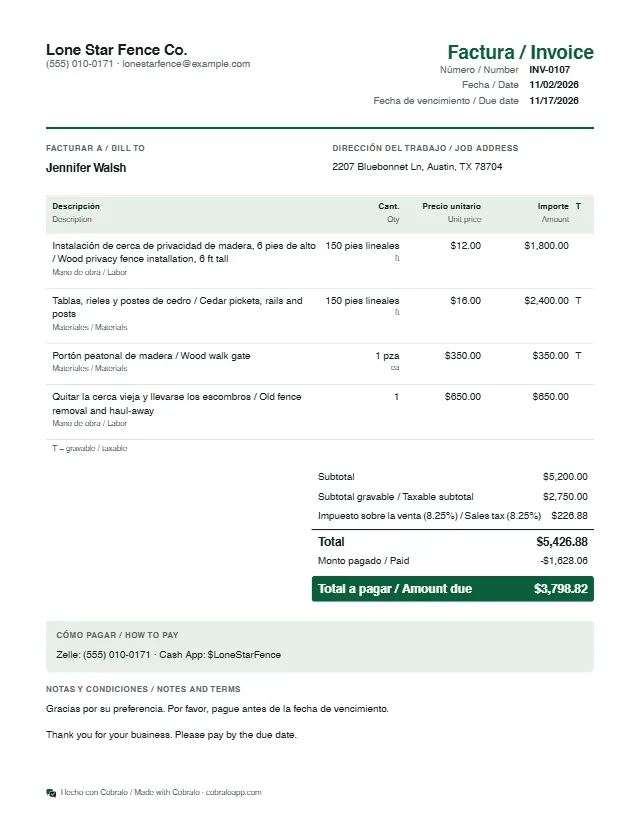
Invoice the day you finish, while the client is still happy with the new fence. Use the same line items as the estimate, with the linear feet you actually installed, and subtract the deposit.
It opens with the sample line items filled in: change them to yours. Free, no sign-up.
Practical tips
- If the line ended up longer or shorter than on the estimate, change the linear feet on the invoice and explain the difference in the notes. A big change should come first, as a signed change order.
- Bill old fence removal and dump fees on their own line. It is real work, and the client sees where the money went.
- Show the deposit you already received so the invoice shows only the balance due. In Cobralo an estimate becomes an invoice in one tap, with the deposit carried over as paid.
- Sales tax on fences varies by state: some tax only the materials. Mark as taxable only the lines that are taxable in your state and, if you're unsure, ask your accountant.
Cobralo makes templates; it isn't legal or tax advice. These tips are general, and rules vary by state and city.
Frequently asked questions
What goes on a fence invoice?
Your business and phone, the client and address, the date and an invoice number, the linear feet installed with their price, gates and removal, tax if it applies, the deposit paid, the balance and how to pay you.
When should I collect the balance?
When the fence is done and you have walked it with the client. Cobralo sets 15 days to pay by default, and you can change the due date.
Can I send the invoice by WhatsApp?
Yes. Download the PDF or share it by WhatsApp, text message or a link, right from your phone.
Haven't quoted the job yet? Start with the estimate: Fencing estimate.